



Whether mandatory or not, a communication partner may be useful in some cases.
Nowadays there is a lot of talk about Sanchar Sathi but how useful is the app? Well, in some cases it can be quite useful.

In the last few days, there has been a lot of uproar regarding the Sanchar Sathi app. Is it mandatory or not? Will it come pre-installed on the phone or not? Who should use it and who should not. After a lot of social media conversations and communication from the Department of Telecommunications, there has been clarity on these issues. At least, we now know that Sanchar Sathi is not an app that is mandatory for people in the country. The government has also clarified that it will not come as a pre-installed system app on the phone. In other words, whether you use it or not, the option remains with you.
This begs the question: should you use it? Is communication partner useful? What is superficial and what is not may also vary for different users. A feature that some users find unnecessary may actually be useful to some others. So, we’re taking a fresh look at the app. And everything that users can do with it. Basically, there are the following functionalities that may be useful to you:
1- Find out how many phone numbers you have
Given that Aadhaar and other KYC details are commonly sought and shared in India, there is a huge problem of misuse of personal details. One misuse is to get a SIM card. Although telecommunications companies must remain vigilant against this abuse, they may fail for a variety of reasons. Result: Someone can get a SIM card or two using your credentials. Now, if you want to check if something like this is happening with your details, you can use Communication Partner to find out all the phone numbers that are taken in your name.
Saathi is an app that plugs into a centralized telecommunications database. Therefore, it can search through the entire database and show you all the numbers that are in front of your name. If you do not recognize any of these numbers from the partner you can deactivate them. This is quite useful.
2- Report your phone as stolen or lost so that it can be blocked on the network
This is the primary functionality of the companion. Now, this might sound like a feature that will help you recover your phone – and according to the government it does in many cases – this feature is used to report a lost or stolen phone so that it can be blocked on the telecom network. This is a useful feature, although some caveats apply. Two major ones are:
1- You will have to give information about your lost or stolen phone through the app present on someone else’s phone. This is because you no longer have access to your lost phone. Or you can use the companion website to file a lost or stolen report.
2- If you want to report your lost phone then you must know its 15 digit IMEI number. it’s mandatory. This number is printed on the retail box of the phone. But if you have thrown away the box, you are out of luck. The IMEI number can also be accessed using *#06# on the phone. Ideally you should have the IMEI number written down somewhere so that if this happens you can report your lost phone on the companion app.
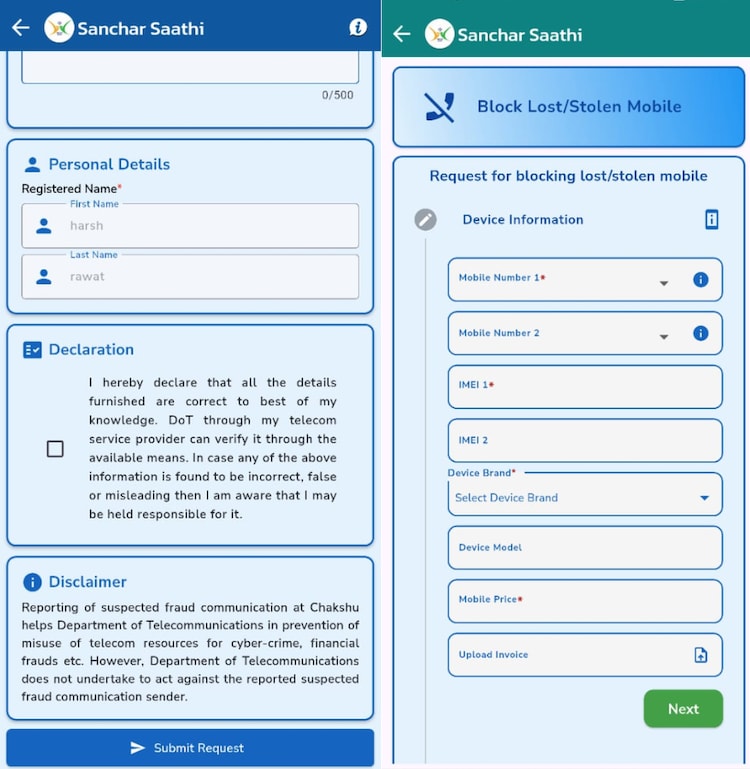
If you successfully submit the details of your lost or stolen phone on the Sanchar Saathi app, the device will be blocked on the phone network. Essentially, this means that even if someone tries to use the phone after resetting it by wiping its software, it will still only work as a Wi-Fi device. It will not work on Indian cellular networks. This happens unless the person who stole the phone uses its IMEI number by dialing *#06# and with some clever tricks unblocks the device using Communication Partner, which is another feature provided by the app.
Also, although it is possible that the phone may be detected if it tries to communicate with the telecom network, the probability of this happening is low. Due to various technical limitations, apps like Communication Companion cannot track a phone the way inbuilt Apple or Android software can. But it’s still better than nothing.
3- Report various fraud and scam calls
This is more of a reporting feature rather than something inherently useful to individual users. However if large numbers of people – say millions – report something day after day, it could make telecommunications networks safer for everyone in the long run.

If you receive any scam SMS or fraudulent call from an Indian number or international number, you can visit Sanchar Saathi and enter the details in the app to report it. Depending on how you feel about such reporting, you may or may not find it useful. As far as the app is concerned, it clarifies that: “Reporting of suspected fraudulent communication in Chakshu helps DoT in preventing misuse of telecom resources for cyber crimes, financial frauds etc. However, the Department of Telecommunications does not undertake to take action against the sender of a reported suspected fraudulent communication.,
4- Find out the authenticity of your phone
The communication partner, because it has access to a centralized database of all IMEI numbers in India, can get some details of the phones. For example, you have purchased a Samsung phone and want to check whether it is fake or genuine. In such a situation, you can use Saathi to know some details of your phone. You can enter the 15-digit IMEI number into the app and it will give you information like the manufacturer of the phone as well as the model number of the device. The app does not tell whether your device is fake or genuine. It only confirms details like model number and brand name. But if they match, it is almost certain that your phone is genuine.
This service can also be availed by sending SMS. kym <15-अंकीय IMEI नंबर> To 14422.
5- Use the app as a directory for some numbers
Another interesting and useful feature of Sanchar Saathi is its ability to provide details of wired internet service providers available in your area. You enter the PIN and then you can see who is providing internet service in your area. Depending on your use case, this can be very useful information.
The app also has a trusted directory feature where you can find contact details of banks and financial institutions. For example, you want to contact ICICI Bank. You can search the directory and it will give you a toll-free customer care number which is 18001025600. Alternatively, you can also enter the number from which you received the call to check whether it is a genuine number from a bank or a call from a scammer.