



How do people become victims of online fraud? We talked to a scammer, and here’s how it works
Almost every day we see stories of people losing lakhs of rupees to some online scam or the other. Recently we came across information about a scammer and then spoke to him and tried to understand how cyber scammers try to trap victims.
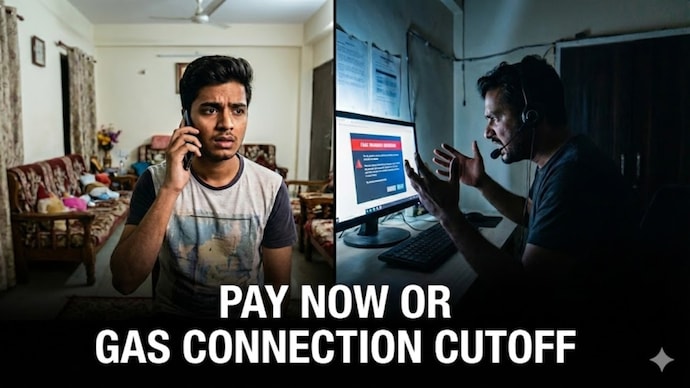

Online scams have now become common on the internet and almost every day we hear that Indians have lost lakhs and crores of rupees in these. There are different types of scams. Digital arrest is one. Pending of utility bills like electricity and gas is another matter. Relatives in Danger is another such scam, and the address is also wrong, fix it now. On the surface, you might feel like the red flags in a scam call are obvious, and there’s no way to fall for something like this. But is that really the case? We spoke to a scammer to understand how they try to trap victims.
Now, for some background, we received a WhatsApp message. It was absolutely strange and even at first glance it looked suspicious. We mean, look at the message below. Interestingly, this message came from a number that is nowhere near Maharashtra, to a person who does not live there.
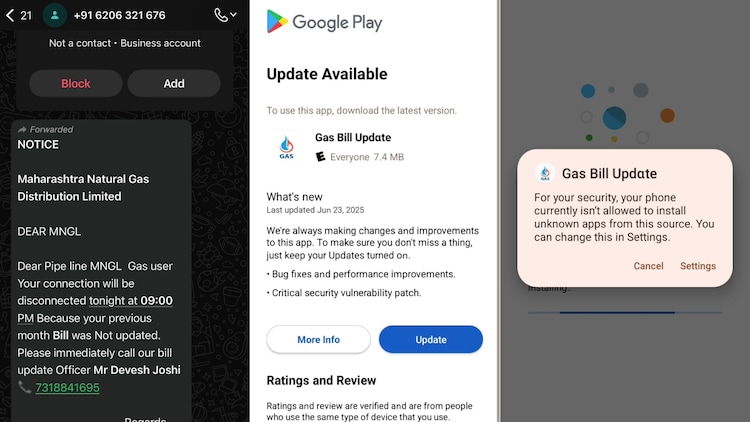
The message informed the user that their gas connection provided by Maharashtra Natural Gas Distribution Limited – actually MNGL – would be disconnected by 9 pm if they did not update the final payment. After this the user was asked to contact a person named Devesh Joshi and was also given his mobile number. The message itself has several red flags, the biggest of which is that it is extremely poorly crafted. Spelling and punctuation are everywhere. And two, this is a forward, from a number without any DP, and clearly missing details like which gas account and which month and how much is pending.
Despite this we decided to call Mr. Devesh Joshi. Well, according to a report in Pune Mirror, Devesh Joshi was arrested earlier for a similar scam. We are not sure whether this is the same Devesh Joshi or Devesh Joshi is an alias used by all such scammers.
Devesh is calling Joshi
So, that’s where we started. We pretended to be a person whose MNGL gas connection was reportedly about to be disconnected. Within a few seconds the person on the other end picked up the call. We told that we had received a message about connection being disconnected and they were ready to help immediately. They did not ask our name or other details to verify who we were. In fact, they didn’t even question us about the phone number from which we were calling, even though it was a different number than the one on which we received the WhatsApp message.
He was quite polite and said that we just need to update our account details. He said, “You update, enter your consumer number, name and mobile number activate. (Update your details, fill your consumer number, name and mobile number).”
But this is where the first red flag comes. The scammer says he will send us to a “site” to fill in the details, but it turned out to be an APK file named “Gas Bill Update”. When we asked if it was an app, he said, “The app has to be updated there. Open the file. (You have to update it there. Open the file).” He also stressed that we must stay on the line with a growing sense of urgency.
However, we told him that now that we have the app, we will install it and then call him again. He agreed to this. We disconnected the call and on one of our test Android phones, which does not contain personal details or any sensitive data, we installed the app.
Interestingly, the Android phone stopped app installation. This happened even when we allowed APK installs from outside the Play Store. This is because Google Play Protect running in the background sensed something was wrong with the APK we were trying to install. Now, while this feature is available on the latest Android phones running the latest version of Android, we suspect that millions of people who have older phones and older versions of Android won’t get the same protection.
Anyway, we decided to talk to the scammer himself to understand how we can install the app when the phone is refusing. So we called the scammer again. Now, they asked us to turn off Google Play Protect on the Play Store and gave a detailed guide, which included “What switch is visible? Is it on? Turn it off. Enter the screen password and turn it off. (Do you see two switches? Are they on? Turn them off. Enter your device’s password and turn them off).”
After doing this, the app installed on the device, and a page opened that looked like the Play Store. The scammer asked us to press updates, but again, we got a warning from the phone not to install updates from unknown sources. This made us understand the workings, so we stopped.
So, what is the methodology?
Once you bypass all the protections your phone is imposing on you – because you’re nervous about your utility bill – the app will install components that will look for sensitive apps on your phone. These can be banking apps or payment apps. The installed APK, at least in sophisticated fraud, will give the scammer direct access to your phone screen. This will work in a similar way to how apps like Anydesk work.

The scammer loses his temper and starts abusing us
We wanted to see what the scammer would do when we told him we couldn’t install the APK. Well, we called him again. He was helpful as always and this time he suggested a video call so that he could walk us through the entire process. He suggested WhatsApp and we sent him hello, which resulted in him video calling us.
On the call, we refused to show our faces though we asked them for instructions regarding the APK. But by now, we doubt Mr Joshi had realized what was happening. Soon, his voice changed. This time a different voice was heard, and the man shouted brutally, “Pagal hai kya? Jab video call karen, video call roke kyun kar de rahe aap? (Are you mad? Why are you stopping the video call?)”
When we tried to respond politely the scammer started using abusive language. He said, “What is becoming a f*****a? What is becoming a f*****a?” He also said that we will know the situation after the connection is cut at night. After this the scammer disconnected the phone and stopped answering.
How do people become victims of digital scams?
to sum it up. The scam starts humbly enough. The scammer talks to you as if someone wants to help you. He even gives you a step-by-step guide to install whatever malware he sent you. But there is one thing they focus on – urgency. The scammer continues to insist that you stay on the line and not hang up, perhaps to ensure that the scam is quickly ended before you have a chance to seek advice from anyone.
That’s why it’s important to look for red flags whenever you get an “urgent” message about money. First of all, read the message carefully. There are so many errors in it that it becomes clear that it is fake. Anyway no company has any designation called “Bill Update Officer”. But if you go and call this person, the first sign to stop is the APK file. No company will ever ask you to download or install files from unknown sources.
Additionally, if you have an updated phone with the latest software, your phone will keep warning you not to install the app, and the scammer will do everything possible to make you ignore all the warning signs. You need to remember that if your phone is warning you, there is something to check, and not just trust some random person on the call.
This scam was different from the usual OTP calls or suspicious links to websites, but it is just one of many different ways these scammers try to trap you.