



Gmail users beware, if you don’t check these 2 settings your mail can be used for AI training
Gmail users are being asked to review privacy settings after viral claims that sensitive email content could be accessed for AI training. A step-by-step guide explains how to opt out, the impact on key features, and Google’s official response.

A recent alert from a tech expert has prompted Gmail users to re-check their privacy settings after claims emerged that Google may automatically choose to allow users access to their private messages for AI training. The warning, which quickly went viral on social media, highlights ongoing concerns about the impact of artificial intelligence in personal data and email services. Engineering YouTuber Davy Jones described the alleged opt-in as a “digital Trojan horse”.
Jones claims that Gmail users have “automatically opted in to allowing Gmail to access all of your private messages and attachments to train an AI model.” According to them, manual action is required to reverse these changes, specifically instructing users: “You must manually turn off smart features in the Settings menu in two places.”
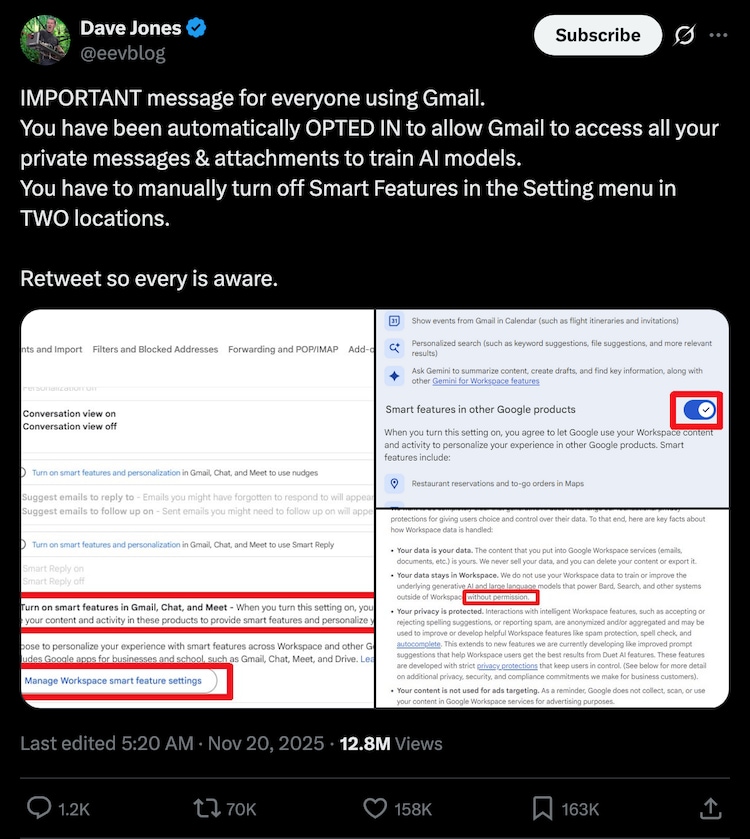
To help users address these privacy concerns, Jones provided a guide for desktop and laptop users: First, click “See all settings,” find the “Smart Features” setting, and uncheck “Turn on smart features in Gmail, Chat, and Meet.” Then select “Manage Workplace smart feature settings” to further adjust permissions related to Google Workspace and other Google products. This two-step process aims to limit personal email data exposure to AI-powered features.
The adjustments do more than just restrict data usage for AI — they also turn off tools like the “Ask Gemini” feature, which provides content summaries and suggestions powered by the Google Assistant and the Gemini app. Mobile users are advised to open their Settings from the Inbox menu, tap “Data Privacy” and manage both “Smart Features” and “Google Workspace Smart Features.”
However, disabling these options comes with a trade-off. Many popular tools, like “Smart Compose,” filtering emails into “promotional” and “social” categories, and basics like spell-check, grammar checking, and autocorrect will be disabled.

These concerns follow a lawsuit filed on November 25 by Illinois resident Thomas Thele (via Bloomberg ), who alleged that “Google secretly turned on Gemini for all of its users’ Gmail, Chat, and Meet accounts, enabling the AI to track its users’ private communications without their knowledge or consent.” “As of the date of this filing, Google continues to track these private communications with Gemini by default, requiring users to affirmatively locate this data privacy setting and turn it off, even if they never ‘agreed’ to such AI tracking,” the filing claims, adding that scrutiny of Google’s privacy policies has intensified.
In response, a Google representative told HuffPost via email that the circulating reports are “misleading.” The company stressed, “Gmail smart features have been in place for many years, and we do not use your Gmail content to train our Gemini AI models,” and stated its commitment to transparency while updating its “service and policies.”
India Today Tech can confirm that the settings are live at the time of writing. Be sure to check if yours is on by default. The good news is that you can turn them off manually if you want more control over your digital life. If you have any concerns about privacy, you know what to do.