



Apple is testing Edge Light in macOS, your Mac screen will soon turn into a ring light for better calls
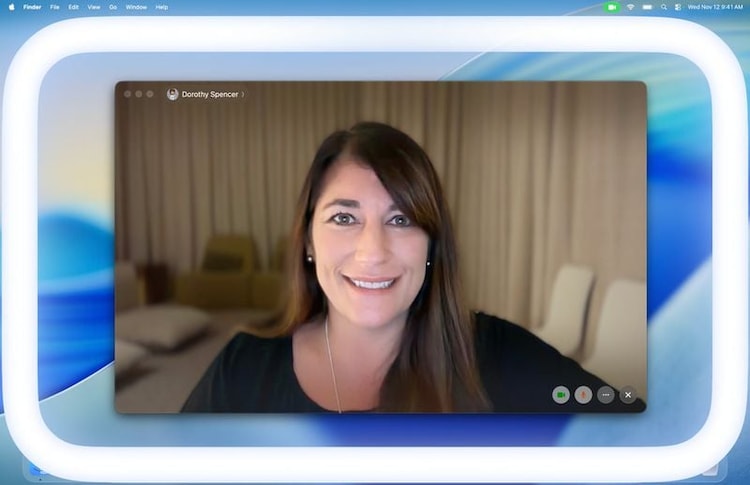
Apple is testing a new feature called Edge Lite. The Edge Light will work similarly to a ring light used to illuminate the foreground of a video or image. However, Apple’s implementation on the Mac would make it much smarter.


Have you ever used a ring light to record Instagram Reels? Now, you can get something similar on your Mac too. Apple is reportedly experimenting with a new feature for macOS called Edge Light, which turns the edges of a Mac’s screen into a built-in ring light to improve video call quality. Edge Light can improve the way users look on camera during online meetings or video calls, especially in low-light environments.
Mac’s Edge Light is a Ring Light, but smarter
Edge Lite is currently available in beta and is expected to launch in macOS 26.2. It is designed to work as a virtual ring light by illuminating the perimeter of the Mac display. However, it is capable of much more than a traditional ring light. When enabled, users can adjust the brightness and tone of Edge Light by selecting warmer or cooler colors depending on their preferences.
Edge Lite takes advantage of both the Apple Neural Engine and the Mac’s Image Signal Processor. These technologies enable the system to detect the user’s face, size, and position in the camera frame, ensuring that the lighting is accurate. The image signal processor can also fine-tune the brightness to match the specific environment, intended to optimize the user’s appearance during a video call.
The feature is also responsive to user interactions. If the cursor or pointer is moved close to the edge of the screen, the edge light will temporarily retract, allowing users to interact with content located at the edge of the display without being disrupted by the illumination effect.
Which Mac models will get Edge Light?
This new feature is compatible with all Mac models that use Apple silicon, i.e. M-series chipsets. Specifically, owners of Macs released after 2024 have the option to set Edge Light to automatically activate when the system detects low ambient light. This automatic mode aims to make the experience seamless, with no manual intervention required when the lighting in the room changes.
How to use Edge Lite on Mac?
Edge Lite is listed alongside other macOS video conferencing features like Portrait Mode, Studio Light, Virtual Background, and Voice Isolation. It works with all major video conferencing applications on Mac, including FaceTime, Zoom, and WebEx. This broad compatibility means users can take advantage of Edge Lite no matter what platform they use for meetings.
Support for Edge Light extended to studio displays, with external cameras also available. The feature builds on similar concepts introduced by other manufacturers, such as HP’s Advanced Lighting from 2021.